The second instalment in a series of posts aimed at demystifying the video production process for the uninitiated marketer.
Updated: 2024-05-23.
How do I translate what’s in my head to video?
As the marketer (or small business owner), you’re not only the project manager of each video production, you’re at least partly responsible for the creative bits like concept, messaging and style. Don’t be afraid to ask your colleagues, trusted friends, or customers for feedback on your ideas. If they know you and your business well, they might be able to help you with some brainstorming.
As I said in my last post, a producer/marketer who is fully engaged throughout the production process will have fewer worries, get more for their money, and be happier with the final results. In my experience, this is a marketer’s best shot at truly translating their ideas from concept to video. (Making changes can be expensive!)
Video may not be a familiar medium for you, but you can make use of tools you might already know and love: your brand style guide and a creative brief. There’s also a third tool that I highly recommend. It’s very useful for planning story sequences end-to-end…storyboards.
- Brand Style Guide
- First rule of branding – BE CONSISTENT! – BE CONSISTENT! – BE CONSISTENT!
- Be sure that you and everyone you work with sticks to brand attributes like brand colours and fonts, brand personality, tone of voice, look and feel, etc.
- I’ve been referred to as the “brand police” by colleagues. I’ve always considered that moniker to be a huge compliment! 😀
- If your business doesn’t have a Brand Style Guide yet, I suggest that it be placed at the TOP of your To-Do list.
- Even without a Formal guide, you’ll have a style or look-and-feel in mind. Perhaps a tagline that really embodies your brand? Give everyone helping you with the video production as much of this kind of information as possible in the creative brief and in your planning meetings.
- Creative Brief
- This tool is, quite literally, what you put into it!
- MarketingProfs.com has a great article on briefs for digital projects. It’s a few years old but still applies 100%.
- There are a million creative brief templates out there. Use your favourite or find one you like that is meant for video content.
- I’ve used this creative brief template from Storybinder.com for video production and really liked it for its simple, straightforward style.
- Note: The creative brief becomes especially important if you do not yet have a brand guide. Run through it carefully with whoever is filming and editing your video. Take your time even if the video is urgently needed. Doing re-takes and re-edits is much more time consuming (and costly) than careful planning!
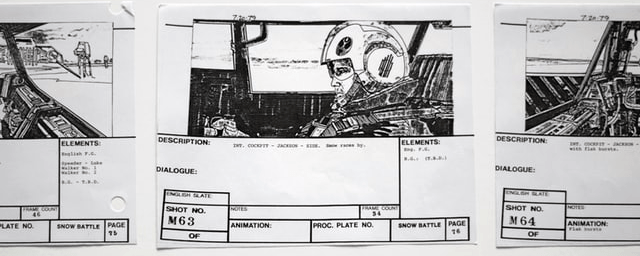
- Storyboards
- Every video you create should tell a story.
- Storyboards help you organize your ideas. They represent a road map for what comes first, second, third, etc. in your story.
- Each storyboard usually represents a one shot or one scene in your video. However, use as many as it takes to tell your tale.
- Hollywood storyboards can be considered art in their own right but you don’t need to be a great artist to make use of this tool.
- Improvise. Dig out your arts and crafts supplies. Use photos of who and what will be on camera and a glue stick. (Who knew kindergarten would be so useful!?) 😉
- Stick figures are OK too!
- Add a description of the scene in writing:
- Describe the location, including any specific needs like special lighting, backdrops, etc.
- Which actors and/or products are in each scene.
- What products/props are needed and where they should be placed. (I’ll talk about ‘continuity’ in a later post.)
- Link each storyboard with the appropriate parts of your script.
- There are many online storyboard apps* out there if you start creating more complex videos; i.e. multiple scenes, multiple actors, multiple locations, etc. However, a pen and paper works just fine for a simple 2-minute product demo or 30 second short. For a quick digital version, try PowerPoint.
If you have questions, I’m happy to chat about my experiences with video production…the good, the bad and the ugly!
- Curious about online storyboard tools? The following sampling have free options. As you become more comfortable creating videos, you might want to access more advanced features, like premium templates, more cloud storage and multiple AI tools. Typically, you can take advantage of free trials if you find the free version doesn’t offer everything you need.
- Canva Free Online Storyboard Tool: Easy-to-use, lots of templates, all-in-one visual design platform, available for mobile iOS and Android.
- Miro Content & Data Visualisation: User friendly whiteboard+ tool, easy collaboration, native project management tools, available for mobile iOS and Android.
- Boords: Created specifically for planning creative projects, easy-to-use, drag and drop features, but limited customised templates.
Unlike wild bears, feeding the content creator is encouraged! 😉
Like, Comment and Share…
The next installment is available now: Take 3: Legal Stuff (Part 1)
© 2021-2025 Tracey Copeland, Rolling Sands Consulting.
 Rolling Sands Consulting
One thought on “Video Production for Marketers Take 2: Idea to Screen”